 SaveNest
Tutorial runs, shop states and other versions are not editable yet. Existing jokers and hand cards are view-only; adding cards and unlocking the collection are not available here.
01 / The manual method
Find the run you are actually playing
%APPDATA%\Balatro\<profile>\save.jkrSelect your profile in Balatro, start an ordinary run, enter a blind and draw your hand. Return to the main menu and exit the game. Windows saves are in %APPDATA%\Balatro; numbered folders belong to different profiles. The current run is save.jkr. Do not use profile.jkr or settings.jkr as the run file.
For a manual backup, copy the complete numbered profile folder elsewhere and record its seed, ante and round. To return to it, close Balatro, keep the current profile separately, then restore the chosen folder under its original number. Continue in that same profile.
02 / The SaveNest workflow
Detect the save, enable backups, keep a way back
Open Balatro in SaveNest, check the save folder and choose Back up now. Keep that backup in the permanent save library as “Before editing this run”, then click its name to open details. Select the matching profile and check its seed, ante and round.
Keep SaveNest running for automatic checks and confirm automation is enabled for this game. The interval is a check schedule, not a guarantee that each tick produces a new distinct save. Busy or changing files may require another attempt; inspect visible failures.
- Find the exact game and edition in SaveNest. Enable backup and review the detected save location and player account. If nothing is found, confirm the game has created a save and resolve detection before continuing.
- Finish the in-game save, exit normally and wait for launcher transfers. Choose Back up now. Stay on the result until success or an actionable error appears; enabling automation alone does not prove a copy exists.
- Turn on Auto backup for this game and choose a backup interval. Keep SaveNest running; check the timeline for a successful backup after your progress changes.
Scroll the table sideways on small screens.
| Task | Manual method | With SaveNest |
|---|---|---|
| Find the active save | Look up the path and identify the account folder yourself. | Detect supported games and save locations; confirm the matching account once. |
| Keep several versions | Remember to copy, date and organize each backup. | Enable automatic backups for timeline history; keep important milestones in the permanent library. |
| Edit the save | Copying a save preserves its existing values. | Edit money, remaining hands and discards on one screen. |
Give this blind another chance
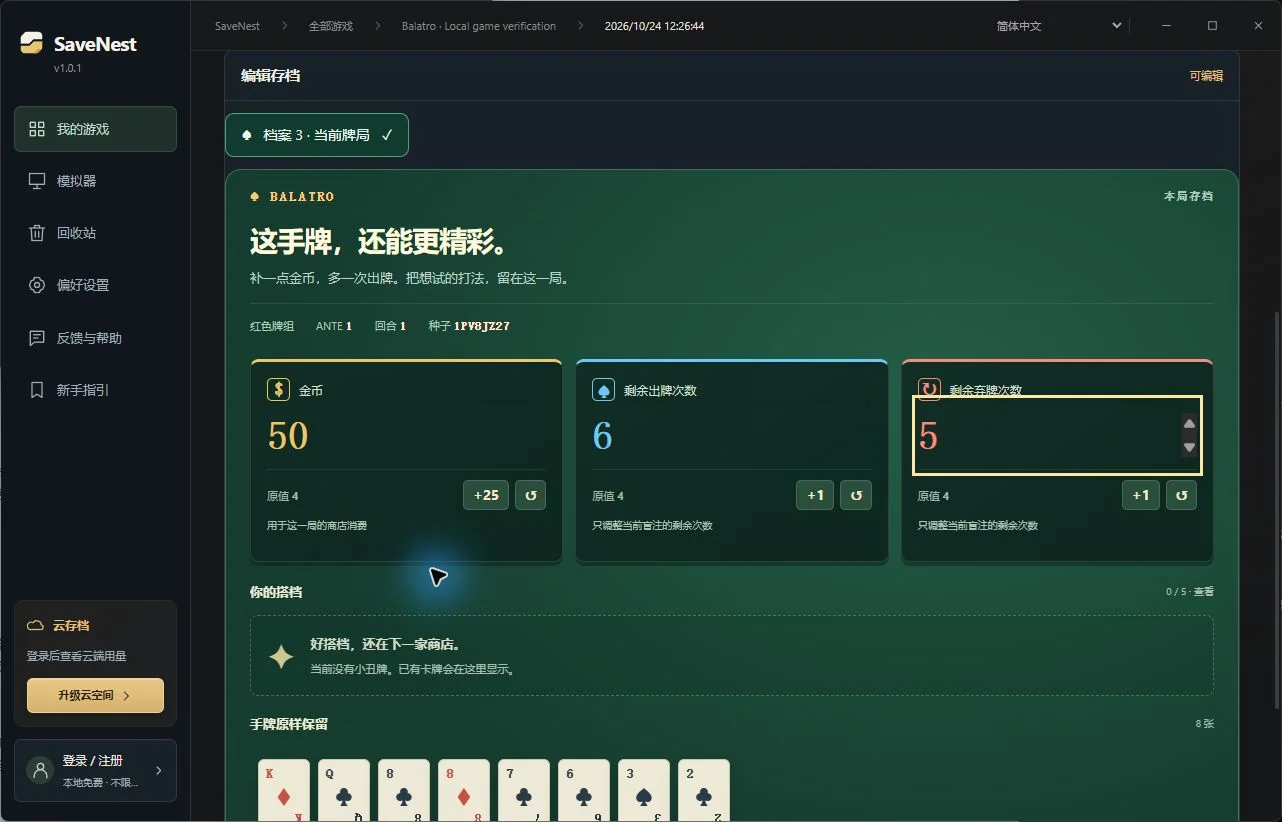
The editing area puts money, hands left and discards left together. Start with a small change, such as 50 money, 6 hands and 5 discards. Hands and discards affect remaining uses in this blind; they do not permanently change the deck’s per-round allowance.
Choose Review and save, compare the original and new values, confirm the game is closed, then choose Back up and save. SaveNest backs up the current files before applying edits. The original run you kept in the permanent library remains available for rollback.
Continue the run and play a hand
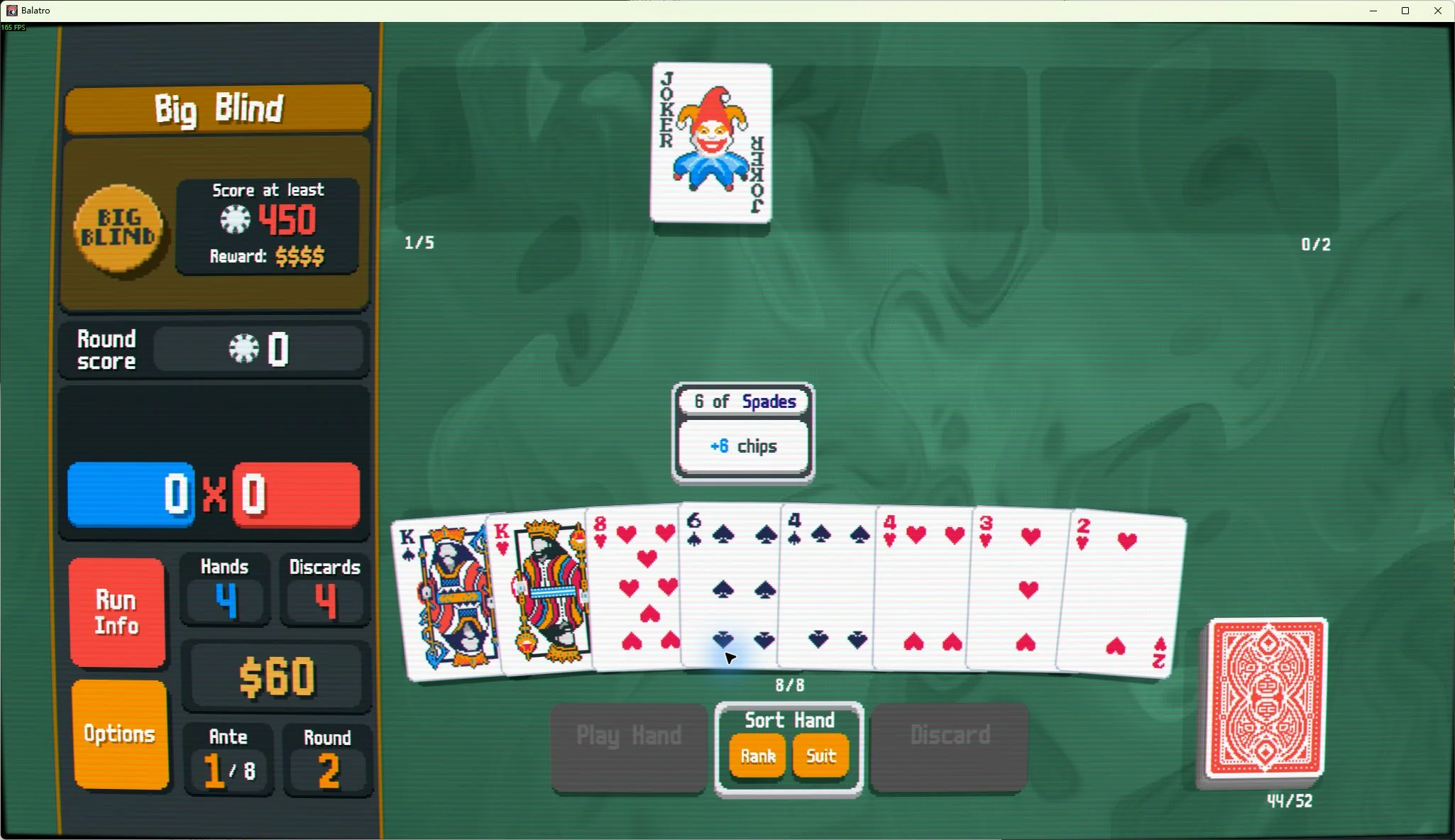
Relaunch Balatro and choose Continue in the same profile, not New Run. Check the money, hands and discards on the left, then actually play a hand or discard.
In this test, 4 money, 4 hands and 4 discards became 50, 6 and 5 in-game. Discarding reduced discards to 4; playing a hand reduced hands to 5. Returning to the menu and continuing preserved those values and the 280 points already scored.
After winning the blind, the test run had 62 money. Buying a joker for 2 left 60. Entering the next blind, exiting and relaunching preserved the 60 money and purchased joker. Hands and discards reset to the deck’s normal values for the new blind.
If the values did not change
To return to the original run, exit the game, find “Before editing this run” in the permanent library and review the restore scope before restoring. If the backup contains other profiles or settings, restoring may affect them too; preserve your current progress first.
- No Continue option, or the tutorial starts again: finish the tutorial, start an ordinary run and back it up inside a blind. Tutorial runs cannot resume through this walkthrough.
- A different run appears: check the profile number and seed. Do not overwrite another numbered folder.
- A purchased card disappears after relaunch: closing directly in the shop returned to an earlier save point in our test. Enter the next blind after buying, then exit and relaunch to check.
- Request support for this save appears: keep the original file and provide the game version and desired changes. A request does not automatically upload the whole save or mean that compatibility is ready.